We built the operating system for industrial repair shops.
Built inside a working motor repair shop. It keeps every motor on one board from teardown to pickup. Once turned on for your shop, it prices a repair from the nameplate and your own past jobs, and SAM can answer your phone.
You do great work. But the business side of running a repair shop has not kept up.
$
Pricing lives in someone's head
Your best estimator goes on vacation and jobs get underquoted for a week. When they retire, decades of pricing knowledge walks out the door. You know this is a risk, but there has never been a good alternative.
?
"Where's my motor?"
Your front desk fields these calls all day long. Customers are not being unreasonable. They just want to know. But every call pulls someone away from real work, and there is no self-serve option to point them to.
!
Flying blind on profitability
You find out which jobs lost money three months later when the accountant finishes the books. By then you have already quoted and completed hundreds more jobs the same way. The feedback loop is too slow to fix anything.
What Changes
Made for motor repair, not adapted to it
General shop software tracks work orders. This tracks motors: HP, frame, nameplate, teardown findings, test results, and every past visit of the unit on your bench.
Quotes priced from your own jobs
Pricing reads the motor's HP and repair type, finds your closest past jobs, and shows a floor, a target and a ceiling with the comparable it used. Your estimator still decides. Once turned on for your shop.
Customers check status and approve quotes without calling
Each customer gets a link to their jobs: status, photos, quotes to approve and invoices to pay online by card. Fewer "where's my motor?" calls at the counter.
A photo of the nameplate fills in the specs
Snap the nameplate or the job tag and the specs land on the job: HP, RPM, frame and voltage. No retyping from a clipboard.
Vendor prices without the phone tag
Describe the part once. The sourcing agent emails your vendors, reads their replies, and lines up price and lead time on the job. Nothing is ordered without your yes. Once turned on for your shop.
Every motor on one board, receiving to pickup
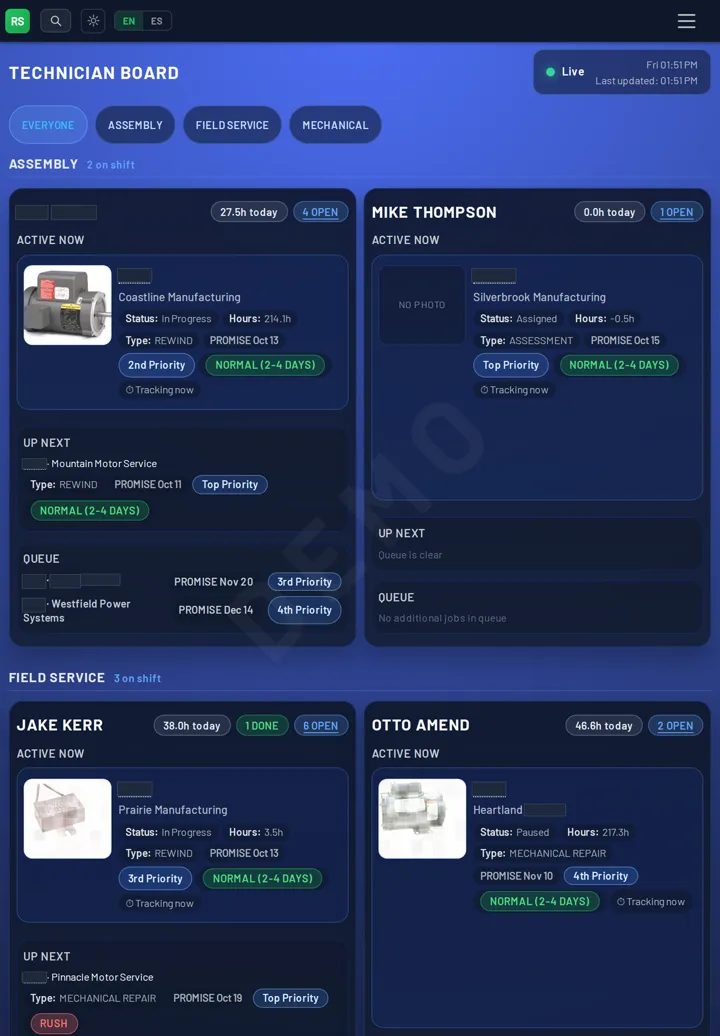
Received, in progress, on hold, ready to invoice, ready for pickup. Techs, the front counter and the customer see the same status, so the whiteboard can come down.
A service sticker on every motor you ship
A QR sticker goes on the repaired motor. Whoever stands in front of it later scans it, describes the problem, and the request lands in your shop with that motor's history attached.
SAM answers the phone and teaches your staff
Once turned on for your shop, SAM answers your line day or night. SAM takes the motor details, gives job status, and flags an emergency to a person right away. New staff can ask SAM where to find things in the system.
See which jobs made money
Job profitability, P&L and cash flow come from the jobs, bills and payments already in the system. You see margin by repair type without waiting for month-end.
Your books, built in
Invoices, bills, payments and the general ledger live in the same system as your jobs, so the books fill in as the work happens.
Close each month and lock it, so nothing changes behind you.
Print cheques from the payment run; each cheque number is used once per bank account.
Reconcile the bank: tick what the statement shows and finish at zero.
Payroll for shops in Alberta: approve the run, the deposits go out, and each person's pay statement is emailed when the money lands.
US sales tax worked out from where the goods ship, and you can see why each rate applies.
Your accountant gets each period's books as one export file.
A sales desk that does not forget
A call list for each rep: their accounts, filtered and saved, to work down by phone, print or export.
Follow-ups that run themselves: put a customer on a follow-up and the emails go out on schedule, and stop on their own when the customer replies or the job is delivered.
Deals that go quiet get flagged: no contact for a week (you set the days), or the close date has passed, and the deal's owner and followers hear about it. Calls, emails, texts and notes all count as contact.
An end-of-day call report for each rep, and a scorecard and weekly sales meeting page for the manager.
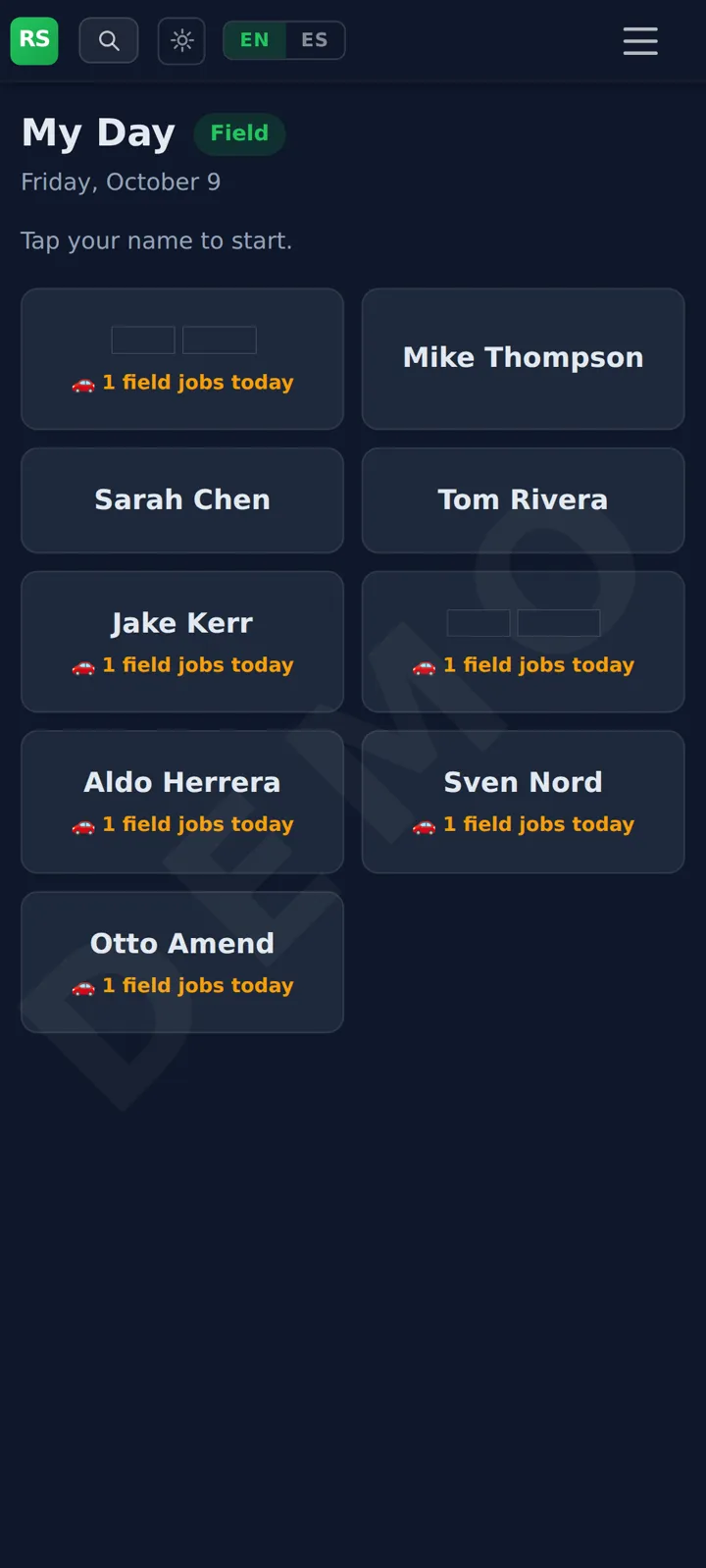
Field service, from the truck
A dispatch map shows where each technician last tapped in, and their day.
Clock in with location, only while on the clock and only with the technician's yes.
Safety forms before the work: the crew fills the job safety form and the job walk on the phone, and, when the shop turns it on, the work timer waits for them.
Field service reports and inspection checklists filled on site.
A signed visit report: time on site, steps done, photos, parts and the customer's signature, emailed to the customer as one PDF.
An office phone built in
Make and take calls from the browser, with no desk phone.
An incoming call shows which customer or lead is calling before you answer.
The call's note, recording and transcript land on the customer, so the next person sees what was said.
Missed calls and voicemails stay marked until someone has seen them.
Already on RingCentral? Those calls and texts land on the customer too.
The app on iPhone, iPad, Mac and Android
One app for the shop on iPhone, iPad, Apple silicon Macs and Android.
Team messages, channels and direct messages, with photos, video, voice notes and documents.
Works with a weak signal: messages wait and send when the phone is back online.
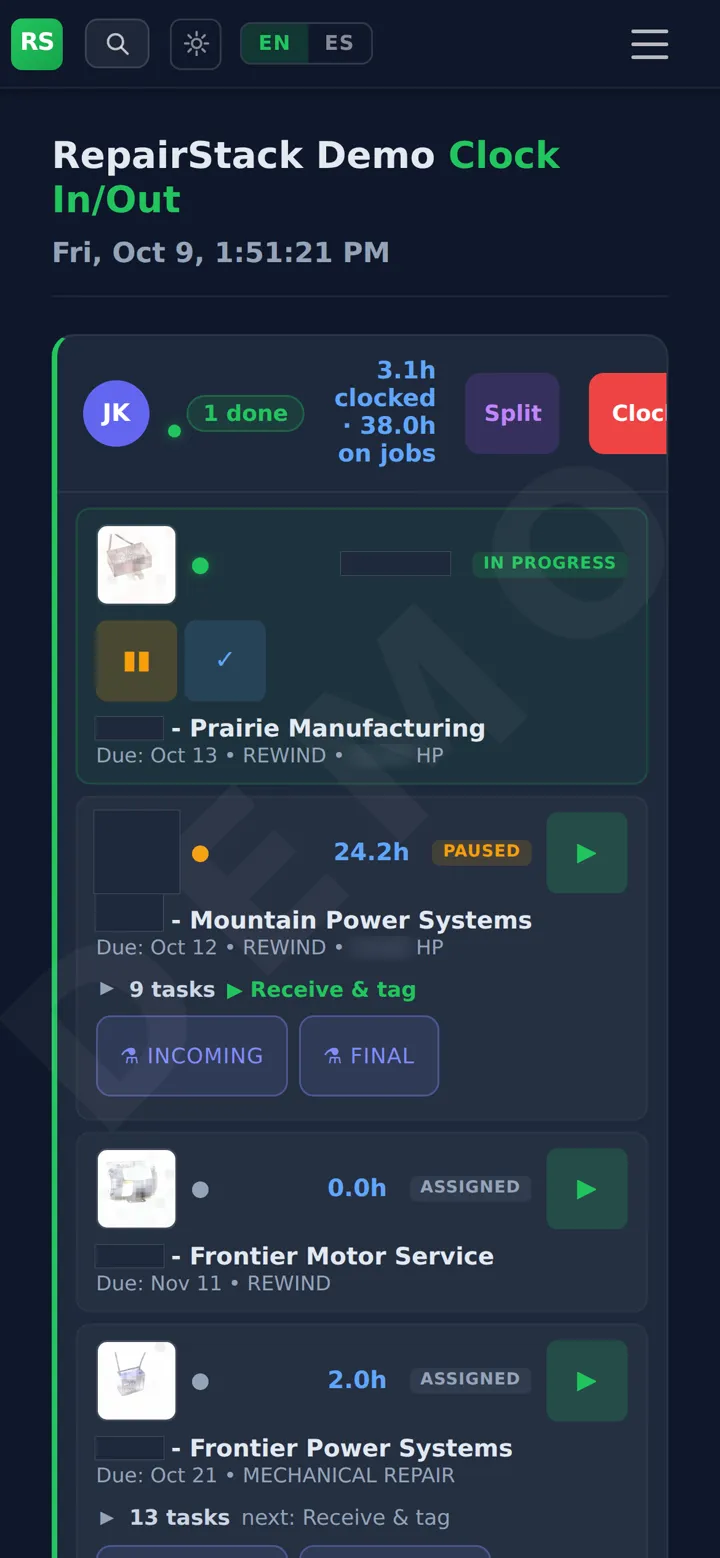
Technicians clock in from the phone; on iPhone the running timer shows on the Lock Screen.
Face ID lock, and the app in English or Spanish.
Moving off MotorBase, or running on Odoo
Moving off MotorBase? We bring your records across and keep them up to date every night until the day you switch, so you can run both side by side.
Each night it brings jobs, quotes, order and invoice lines, vendors, purchase orders and receiving, customer payments, vendor bills and payments, stock movements, job status history, form answers and labour.
Each night ends with a check that the two systems agree.
It only reads from MotorBase, so nothing in your MotorBase changes.
Running on Odoo? RepairStack reads it every five minutes: customers and contacts, jobs and job lines, sales orders, manufacturing and work orders, equipment, invoices and credit notes, taxes, purchase orders, messages, attachments and vendors.
Your team sees the Odoo details right on the job page.
Anything that does not come across cleanly lands in an exceptions list; fix the cause and press Retry.
It only reads from Odoo, so your Odoo records stay as they are.
Good, better, best quotes
Send one quote with good, better and best options printed side by side; the option the customer accepts is the one that goes on the invoice.
See It Work
The screens your shop would run on
Short clips and screens from the RepairStack demo shop. The names are demo names.
Dollar figures are blurred. Job, quote and contact numbers, and any name that matches a real business or person, are covered. The demo estimate in the pricing clip is shown as is.
On the bench, in the truck, at the desk
The RepairStack app runs on iPhone, iPad, Mac and Android. Techs clock in, switch jobs and work their steps from the phone or a tablet on the bench. The office runs the same shop from a desktop.
Screens shown are RepairStack at each device's screen size, on the demo shop.
iPhone
Android
iPad
Mac
Not a Demo. Not a Prototype.
This runs real shops. Every day.
$148K/yr
In underpriced jobs caught
The ML pricing engine found $148,000 per year in jobs that were being quoted too low. That is recovered margin, not a projection.
Seconds
From intake to accurate quote
Snap a photo of the nameplate. The system reads the specs, pulls similar job history, and recommends a price. What used to take 20 minutes now takes seconds.
Far fewer
"Where is my motor?" calls
Customers check status, approve quotes, and pay invoices online. Your front desk gets their day back. Automated notifications keep everyone in the loop.
RepairStack was built inside an active industrial repair shop in Calgary, Alberta. It was not designed in a lab. Every feature exists because someone on the shop floor needed it.
“
We ran this shop on paper and spreadsheets for years. RepairStack replaced all of it. Pricing that used to live in one person's head is now in the system, jobs never fall through the cracks, and our customers check their own status instead of calling us. When your best estimator leaves, you lose 40 years of knowledge overnight. This system makes sure that never happens. I have already started showing it to other shops because I think any industrial repair operation would want this.
Jens Jensen
General Manager, Complete Electric Motor Repair
Running RepairStack in production since day one
Case Study
From spreadsheets to real-time visibility
How a 40-year-old motor repair shop in Western Canada transformed its operations with RepairStack.
CS
Western Canadian Motor Repair Shop
6 technicians, 40+ years in operation, full-service industrial motor repair
Before RepairStack
✕Pricing lived in one person's head after 40 years
✕Job tracking on spreadsheets and whiteboards
✕15-20 "where is my motor?" calls per day
✕Financial visibility weeks behind
✕Quote turnaround depended on one senior estimator
After RepairStack
✓$148K/yrin underpriced jobs identified by ML*
✓Customer portal eliminated most status calls
✓Real-time P&L instead of waiting for accountant
✓AI-assisted pricing in seconds, not hours
✓Online payments cut collection time significantly
* $148K figure based on comparing ML-recommended prices to actual quoted prices across all completed jobs over 12 months. The gap represents revenue that would have been captured at the data-driven price. Validated by month-over-month revenue growth after implementation.
"The biggest surprise was not the pricing engine. It was how fast the team adopted the system. Technicians who had never used anything beyond a clipboard were logging time and taking job photos within the first week."
-- General Manager, 6 years at the shop
Book a Walkthrough
Real dashboards. Real data. Running in active shops.
These are not mockups. Every screen below runs in production at active industrial repair shops.
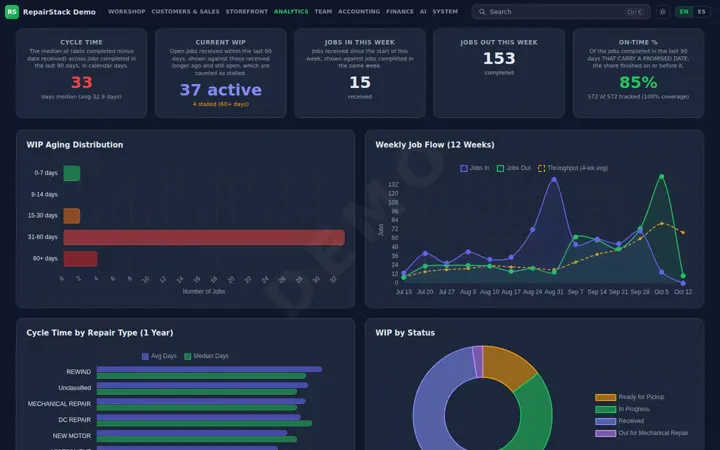
Executive Dashboard
Know if you are having a good month before you finish your coffee. Revenue, margins, backlog, and trends in one view.
Process Flow
See every job moving through your shop. Drag and drop between stages. Nothing falls through the cracks.
AI Chat Assistant
Ask a question in plain English. It pulls live data, runs pricing models, cross-references your pipeline, and gives you real business insights, not canned reports.
Shop Floor TV
Mount a screen in the shop. Everyone sees active jobs, timers, and who is working on what. No one needs to ask.
No app to install. No password to remember. Customers get a magic link and instantly see their jobs, approve quotes, and pay invoices.
Job Status at a Glance
Customers see every job with photos, status, and repair details. No more phone calls to check on their motor.
One-Click Quote Approval
Send a quote, customer approves it with one tap. No printing, no faxing, no phone tag. Work starts faster.
Pay Online Instantly
Customers pay the invoice online by card through a secure checkout, from the email or the portal.
Instant Access via Magic Link
No passwords, no app installs. Customers click a secure link from their email or text and they are in. Frictionless access that works on any device.
How It Works
Three steps. Your shop keeps running the whole time.
We handle the heavy lifting. You keep doing what you do best.
1
Connect Your Data
Bring your data across. Your customers, jobs and history come straight from MotorBase or Odoo, or from your current system's exports. Your shop keeps running while we do it.
2
We Train the AI on YOUR History
The pricing engine learns from your actual jobs, your customers, your pricing patterns. Not generic industry data. Your data, your competitive advantage.
3
The System Gets Smarter Every Week
As you close jobs, the model retrains automatically. Pricing accuracy improves. Blind spots shrink. Your data keeps compounding.
See It Live
Book a walkthrough
We will show you the system on a screen share on made-up demo data. Questions? Talk to Sam or reach us at info@repairstack.ai | (855) 966-0195.
Every deployment is tailored to your shop. Setup includes data migration, AI training, and team onboarding. Monthly plans include fair-use AI; SAM voice usage is metered with a bundled monthly allowance.
FAQ
Common Questions
Most shops are live within 4 to 6 weeks. That includes connecting your data, training the AI on your job history, configuring the system to match your workflow, and training your team. Your shop keeps running normally the entire time.
No. Your accountant gets each period's books as one export they load into QuickBooks, Sage or whatever they use. And you may not need a separate system at all: invoices, bills, payroll, cheques and bank reconciliation are built in, in the same place as your jobs. Moving off Sage 50? We bring your payroll history across.
Industrial repair and service shops: electric motor repair, pump repair, gearbox repair, HVAC service, electrical contracting, and similar operations. If your shop handles work orders with variable scope and pricing, RepairStack was built for you. It started in a motor shop and has expanded to serve the broader industrial MRO market.
RepairStack connects to the tools shops already run. Moving off MotorBase or running on Odoo? Your records come across and stay up to date. Calls and texts from RingCentral land on the customer, or use our built-in office phone. Mail from Gmail or Microsoft 365 lands on the customer too. Anything else, we bring across from your exports during setup.
Yes. Encryption in transit and at rest, strict separation of each customer's data, rate limiting, session management, and audit logging. Your data stays yours and is never shared between customers or used to train models for anyone else.
It does not just average your past prices. The engine trains on your actual completed jobs and learns which jobs you priced well and which ones you left money on the table. It looks at motor specs, repair type, job complexity, customer history, and 30 other factors to find the highest price your customer will pay and still walk away happy. That is the key difference -- it is not doing mean reversion back to your historical average. It is finding the ceiling on each job. The model retrains itself every week as you close more jobs, so it keeps learning what your market will bear.
That is exactly who RepairStack is for. We migrate your existing data, including job history, customer lists, and pricing records. The system replaces the spreadsheets, whiteboards, and sticky notes without changing how your team works day to day. Most technicians are comfortable with it within a week.
Yes. Techs clock in and out with one tap, see their assigned jobs, log time to specific jobs, and take photos directly from their phone or a tablet. There is also a shop floor TV view designed to be mounted on a screen so everyone can see active jobs and timers at a glance.
Your customers get a secure link to check the status of their jobs in real time. No login required, just a magic link sent via email or text. They can see job progress, approve quotes with one click, view photos of the repair, and pay invoices online with a credit card. You stop fielding "where is my motor?" calls.
The system is cloud-based, so it requires an internet connection for real-time features. However, the shop floor TV and time tracking pages cache data locally. If connectivity drops briefly, timers keep running and data syncs when the connection is restored. For extended outages, your team can fall back to manual tracking and enter data later.
Yes. Book a walkthrough from any page and we will show you the platform on a screen share, on made-up demo data. No slides.
Start by booking a walkthrough. If you like what you see, the next step is a $500 consultation where we dig into your specific shop and show you exactly how RepairStack would work for your operation. That fee is credited toward your setup if you proceed. You can book a consultation through Sam (bottom right of this page) or email us at info@repairstack.ai.
Yes. Each location gets its own configuration while sharing the same customer database and reporting. Managers can see consolidated dashboards across all locations or drill into a specific shop. Pricing models can be trained per location to account for regional differences.
Setup, migration, configuration, and training are all part of the package. The complexity varies by shop, but we handle the heavy lifting so your team can keep working. After launch, ongoing support is included via phone and email. We monitor your system health automatically and proactively fix issues before they affect your operations.